

Defining a 2026 security vision
Smart home security in 2026 is about more than just getting a notification after someone kicks in your door. I've seen the shift toward systems that use local data to spot trouble before it happens. We're moving away from basic sirens toward setups that actually understand your daily routine.
This isn’t just about adding more gadgets; it’s about building a cohesive ecosystem where all your security devices work together seamlessly. Think beyond a doorbell camera to a network of sensors, cameras, and automated responses that create a layered defense. The evolving threat landscape demands a more sophisticated approach. Criminals are becoming more tech-savvy, and your security system needs to keep pace.
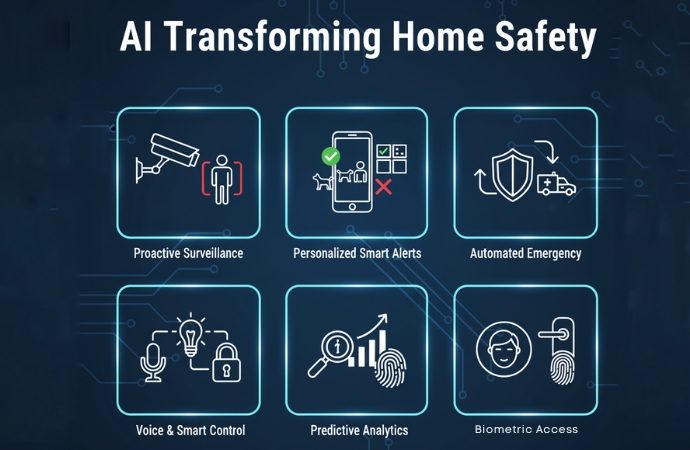
The shift from reactive to predictive security is powered by artificial intelligence. AI algorithms can analyze data from your sensors to identify patterns and anomalies that might indicate a potential threat. For example, a system could learn your typical activity patterns and flag any unusual activity, such as a door opening at an unexpected time. This allows for a quicker, more targeted response.
Building such a system requires careful planning and a willingness to get your hands dirty. It’s a commitment, but the peace of mind – and the increased security – are well worth the effort. This guide will focus on creating a dream smart home security system through DIY projects, leveraging the latest technologies available.
Sensors, hubs, and the network
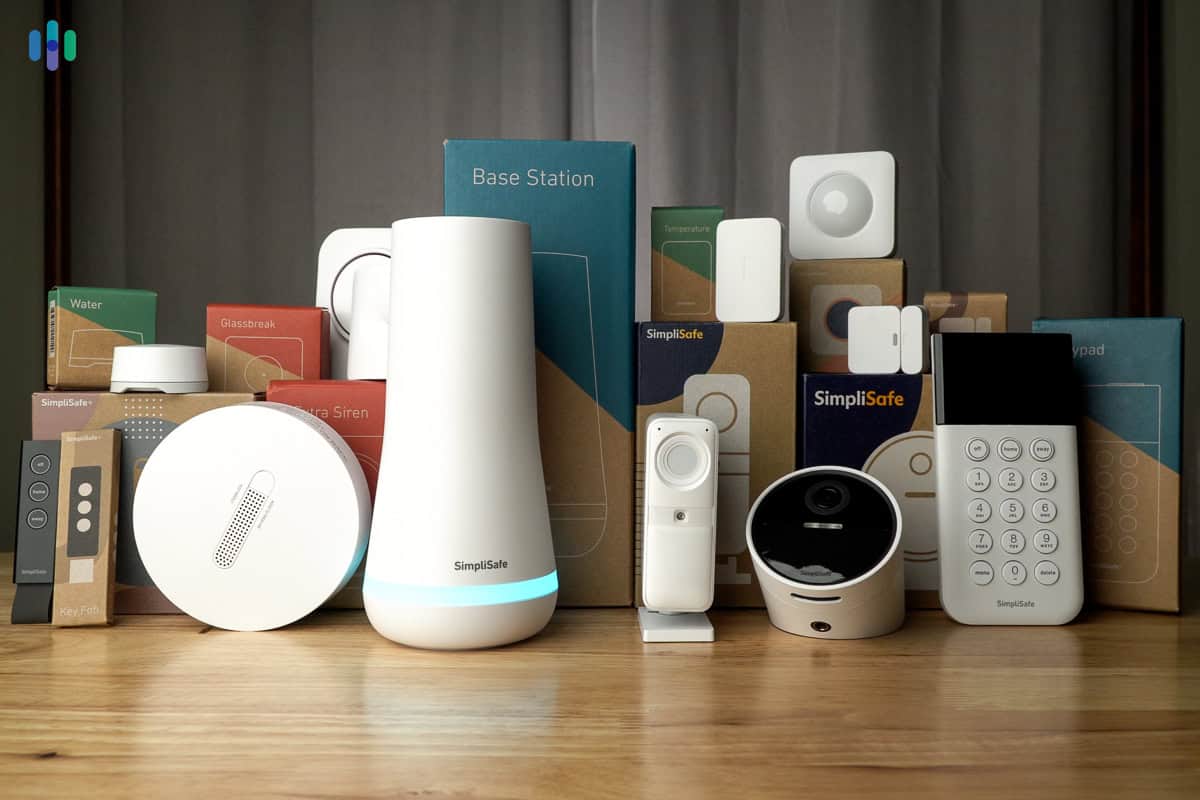
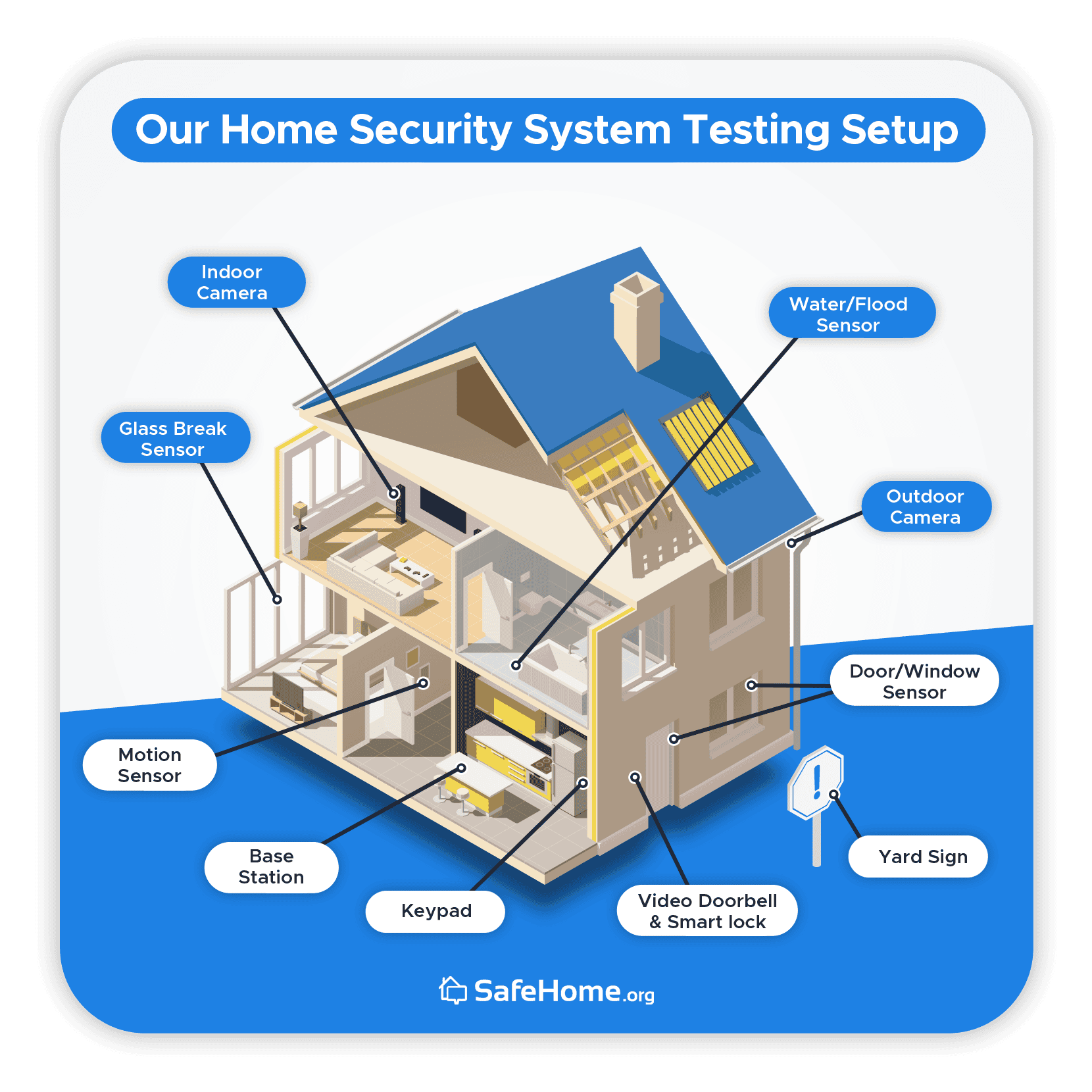
At the heart of any smart home security system are the sensors. These are your eyes and ears, detecting potential threats and triggering automated responses. Common types include motion sensors, which detect movement within a designated area; door and window sensors, which alert you when a door or window is opened; and glass break sensors, which detect the sound of breaking glass. Don’t forget environmental sensors – smoke, carbon monoxide, and water leak detectors are essential for a comprehensive safety setup.
You need a hub to tie everything together. Home Assistant is my top pick if you like to tinker and want total control. Hubitat Elevation is better if you want something that works locally without a cloud connection. Samsung SmartThings is the easiest to set up, but you lose some of that granular privacy.
But even the best sensors and hubs are useless without a robust and secure network. Wi-Fi is the most common option, but it can be susceptible to interference and security vulnerabilities. Z-Wave and Zigbee are low-power mesh networking protocols that offer better reliability and security, but they require a compatible hub. I've found Z-Wave to be particularly reliable in larger homes.
Mesh networking is crucial for ensuring consistent coverage throughout your home. In a mesh network, each device acts as a repeater, extending the range of the network. This is especially important for larger homes or homes with thick walls. The emerging Thread and Matter standards aim to simplify interoperability between different devices and platforms, which could be a game-changer in the future, though adoption is still developing.
- Motion sensors to track movement in hallways
- Door/Window Sensors: Detect openings.
- Glass Break Sensors: Detect breaking glass.
- Environmental Sensors: Smoke, CO, water leak detection.
Smart Home Hub Comparison - 2026
| Local Control | Cloud Dependency | Protocol Support | Ease of Use | Customization |
|---|---|---|---|---|
| Home Assistant | Offers extensive local control; can operate entirely offline once configured. Requires initial setup and ongoing maintenance for optimal performance. | Relies on internet connectivity for some features like voice assistant integration, but core functionality remains local. Cloud access is optional. | Z-Wave, Zigbee, Matter, and many others via integrations. Broadest protocol support, but requires more technical knowledge to set up. | Steep learning curve initially, but extremely customizable through YAML configuration and a large community-supported add-on ecosystem. Highly flexible. |
| Hubitat Elevation | Prioritizes local control. Processing occurs on the hub itself, minimizing reliance on external servers. Rules and automations run locally even during internet outages. | Minimal cloud dependency. Some optional cloud services are available for remote access, but the system functions fully without them. | Z-Wave, Zigbee, and Matter. Focuses on these core protocols for reliable local automation. | Generally easier to configure than Home Assistant, utilizing a Groovy-based rule engine with a graphical user interface. Still requires some technical understanding. |
| Samsung SmartThings | Offers a blend of local and cloud processing. Some automations can run locally, but many features depend on the cloud. | Significant cloud dependency. Core functionality and remote access rely heavily on Samsung's servers. Service disruptions can impact functionality. | Z-Wave, Zigbee, Matter, and Wi-Fi devices. Good compatibility, but increasingly focused on Matter integration. | Designed for ease of use with a user-friendly mobile app. Simplifies setup and automation creation for beginners. |
| Apple HomeKit | Relies on a 'Home Hub' (Apple TV, HomePod, or iPad) for local automation. Automations continue to function even without an internet connection, provided a Home Hub is present. | Moderate cloud dependency. Siri voice control and remote access require an iCloud account. Core automations run locally via the Home Hub. | Matter, HomeKit-enabled devices, and compatibility with some existing Z-Wave and Zigbee devices via HomeKit bridges. Increasingly focused on Matter. | Very easy to use, especially for existing Apple users. Simple setup and intuitive interface. Limited customization options compared to other hubs. |
Illustrative comparison based on the article research brief. Verify current pricing, limits, and product details in the official docs before relying on it.
Building a layered defense
Let's get practical. A layered intrusion detection system is the most effective way to protect your home. Start with the basics: door and window sensors on all exterior doors and ground-floor windows, combined with motion detectors in key areas like hallways and living rooms. This provides a first line of defense, alerting you to any unauthorized entry.
But don’t stop there. Consider adding glass break sensors to protect vulnerable windows. Vibration sensors can detect attempts to force open doors or windows. Acoustic sensors can listen for the sounds of forced entry, even if the glass doesn’t break. These additional layers add significant redundancy and make it much harder for an intruder to bypass your security system.
Integrating these sensors with your chosen hub allows you to create custom automations. For example, you could set up an automation that turns on all the lights and sounds an alarm if a door sensor is triggered while you’re away. Or, you could receive a notification on your phone if motion is detected in a specific area at night. The possibilities are endless.
A step-by-step guide for a basic setup: 1) Install door/window sensors on all entry points. 2) Place motion detectors in high-traffic areas. 3) Connect sensors to your hub. 4) Configure automations based on sensor triggers. 5) Test the system thoroughly. 6) Regularly update firmware and security settings. Remember to consider pet immunity settings on motion detectors to avoid false alarms.
Integrating Smart Locks & Access Control
Smart locks are no longer just a convenience feature; they’re a critical component of a modern security system. Different types are available: deadbolts replace your existing deadbolt, lever handles are ideal for interior doors or doors without a traditional deadbolt, and keypad locks offer keyless entry. August and Schlage are two well-respected brands in this space.
Integration with your smart home hub is essential. This allows you to remotely lock and unlock your doors, create temporary access codes for guests, and receive notifications when someone enters or exits your home. Many smart locks also integrate with voice assistants, allowing you to control them with your voice.
However, smart locks are not without their vulnerabilities. They can be susceptible to hacking or physical attacks. It’s crucial to choose a lock with strong security features, such as encryption and tamper detection. Regularly update the lock’s firmware and be mindful of the access codes you create.
Biometric options, such as fingerprint scanners, offer an extra layer of security, but they’re not foolproof. They can be susceptible to spoofing, and they may not work reliably in all conditions. Consider the trade-offs carefully before investing in a biometric lock.
Automated Responses: Alarms, Notifications, and Deterrents
The true power of a smart security system lies in its ability to respond to threats automatically. Configure automated responses based on sensor triggers. For example, if a door sensor is triggered while you’re away, the system could sound an alarm, send a notification to your phone, and turn on all the lights. A loud siren is a great deterrent.
Avoiding false alarms is crucial. False alarms can desensitize you to real threats and may even result in fines from local authorities. Fine-tune your system by adjusting sensor sensitivity, creating exclusion zones, and using AI-powered analytics to filter out false positives. Some hubs allow you to delay the alarm activation to give yourself time to investigate.
Smart lighting can be a powerful deterrent. You can program your lights to turn on and off randomly while you’re away, creating the illusion that someone is home. Similarly, a smart sound system can be programmed to play sounds, such as barking dogs or human voices, to deter potential intruders.
Consider integrating your security system with emergency services. Some hubs offer professional monitoring services that can automatically dispatch the police or fire department in the event of an emergency. However, be aware that these services typically come with a monthly fee.
Advanced Integrations: Fire, Water, and Environmental Safety
Security isn’t just about protecting against intruders; it’s about safeguarding your home from all types of hazards. Integrate smoke detectors, carbon monoxide detectors, and water leak sensors into your smart home system for comprehensive protection. Nest Protect, for example, offers both smoke and carbon monoxide detection with smart alerts.
Early detection is key. Smoke detectors and carbon monoxide detectors can provide valuable warning in the event of a fire or gas leak, giving you time to evacuate. Water leak sensors can detect leaks before they cause significant damage, allowing you to shut off the water supply and prevent costly repairs.
Automated responses can further enhance your safety. For example, you could program your system to automatically shut off the water supply if a water leak is detected. Or, you could receive a notification on your phone if the temperature drops below a certain level, potentially preventing frozen pipes.
Don’t forget about battery backups. Power outages can render your security system useless, so ensure that all your devices have battery backups. Regularly test your sensors and detectors to ensure they’re functioning properly. A well-maintained system is a reliable system.
What's your preferred method of receiving security alerts from your DIY smart home system?
As you build out your dream smart home security setup, alert delivery is a critical decision. How do you want to be notified when something triggers your system? Vote below and share your reasoning in the comments!

No comments yet. Be the first to share your thoughts!