

Smart Home Evolution: 2024-2026
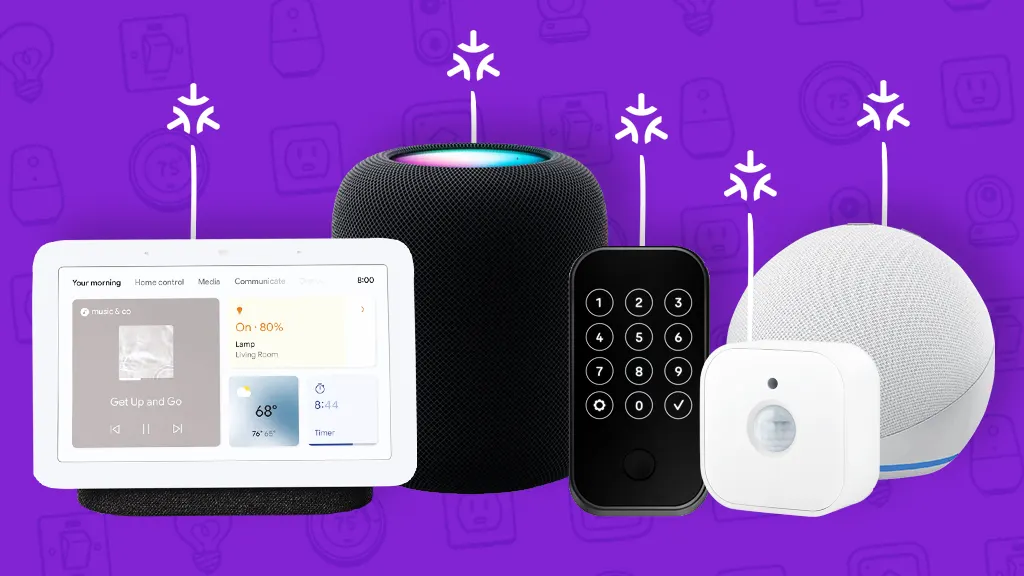
In 2024, the smart home market was already crowded with devices, but often fragmented. Interoperability was a huge pain point, with different ecosystems struggling to communicate. The big story was the slow rollout of Matter, the connectivity standard promising to unify everything. By 2026, we’re seeing Matter finally deliver on some of that promise, though it’s still not universally adopted. It’s less about completely new categories of devices and more about refinement – better performance, improved security, and more seamless integration.
The biggest change isn’t a single gadget, but a shift in approach. 2026 sees more emphasis on local control, driven by privacy concerns and the desire for faster response times. Cloud outages became increasingly frustrating for users in 2025, accelerating this trend. We're also seeing AI play a larger role, not in flashy robots, but in smarter automation routines that learn from user behavior. Think lighting that adjusts based on your daily schedule, not just a timer.
While the hype around fully automated homes has cooled, the practical benefits of smart home automation are undeniable. Energy savings, increased security, and simple convenience are still the main drivers for adoption. However, concerns about data privacy and the potential for hacking haven’t gone away. Choosing devices and systems with strong security features and a commitment to data protection is more important than ever.
The push for open standards like Matter is a direct response to consumer frustration. It aims to prevent vendor lock-in and give users more control over their data. It’s not a perfect solution, and some older devices won’t be compatible, but it's a significant step in the right direction. The landscape is maturing, becoming less about flashy gadgets and more about building a reliable, secure, and truly smart home.
The Core: Smart Home Hubs
The smart home hub is the brain of your operation, and choosing the right one is crucial. Home Assistant remains the undisputed champion for tech enthusiasts. It’s open-source, incredibly flexible, and supports a massive range of devices. However, it has a steeper learning curve than other options and requires more technical expertise to set up and maintain. The active community is a huge asset, providing support and custom integrations.
Hubitat Elevation is a strong contender for those who prioritize local control and privacy. It doesn’t rely on the cloud, meaning your automations will continue to work even if your internet goes down. It’s less complex than Home Assistant but offers less flexibility. SmartThings is another popular option, offering a balance between ease of use and functionality. It’s cloud-dependent, but Samsung has made improvements to its local processing capabilities.
All three hubs now offer varying levels of Matter support. Home Assistant was an early adopter, and offers excellent compatibility, but requires some configuration. Hubitat added Matter support in late 2025, and SmartThings has fully integrated the standard into its latest hardware. When deciding, think about where your devices are and how important local control is. A cloud-reliant hub is fine if you have reliable internet, but if you live in an area with frequent outages, local control is essential.
Apple HomeKit is worth mentioning, but it’s often limited in its openness. It works well within the Apple ecosystem, but it doesn’t support as many devices as Home Assistant or Hubitat. It’s a good choice for users who are heavily invested in Apple products and prioritize simplicity, but it won’t give you the same level of customization or control.
- Home Assistant: Open-source, highly customizable, steep learning curve.
- Hubitat Elevation: Local control, good privacy, less flexible than Home Assistant.
- SmartThings: Cloud-dependent, easy to use, good balance of features.
- Apple HomeKit: Simple, works well with Apple devices, limited compatibility.
Smart Home Hub Comparison: Hubitat vs. Home Assistant vs. SmartThings (2026)
| Local Control | Matter Support | Ease of Use | Community Size | Cost |
|---|---|---|---|---|
| Excellent, fully local operation. Rules and automations run on the hub even without internet connectivity. | Native Matter support is present, offering broad device compatibility. | Moderate. Requires some technical aptitude for advanced customization, but the interface is generally user-friendly. | Large and active, but smaller than Home Assistant's. Strong focus on practical solutions. | Hubitat hubs typically range in price depending on features, with options for different sized homes. |
| Extensive, relies on local operation as the primary mode, but cloud options are available. Highly customizable. | Strong Matter support through ongoing development and integrations. Offers flexibility in implementation. | Steep learning curve. Requires significant technical knowledge, particularly for initial setup and complex automations. | Very large and highly active. A vast online community provides extensive support and resources. | Primarily open-source and free to use, but costs may be incurred for hardware (Raspberry Pi or similar) and optional add-ons. |
| Limited, relies on cloud for some functions, even with a hub. Functionality can be impacted by internet outages. | Supports Matter through integrations and updates, but may require bridge devices for some older devices. | Generally easy to use, with a streamlined mobile app and simple automation creation tools. | Large and well-established. Benefits from Samsung's backing and a broad user base. | Relatively affordable, with a range of hub and device options. Subscription services may be available for advanced features. |
| Advanced users can leverage custom Groovy code for complex automations. | Matter integration is continually improving with firmware updates. | Moderate, the interface is intuitive for basic tasks, but customization can be complex. | Active, but smaller than Home Assistant or SmartThings. | Hubitat hubs have a one-time purchase cost, with no ongoing subscription fees. |
| Highly flexible with Python scripting and a growing number of integrations. | Continually evolving Matter support, driven by community contributions. | High, requires significant technical expertise and a willingness to troubleshoot. | Extremely large and active, representing a diverse range of users and skill levels. | Primarily the cost of hardware, with optional paid services for add-ons or support. |
| Samsung continues to expand device compatibility and improve cloud services. | Matter support is a key focus for Samsung's smart home ecosystem. | High, the SmartThings app is user-friendly and offers a wide range of features. | Very large, benefiting from Samsung's brand recognition and extensive marketing. | Hubs are relatively inexpensive, but the cost of compatible devices can add up. |
Illustrative comparison based on the article research brief. Verify current pricing, limits, and product details in the official docs before relying on it.
Lighting: Beyond the Bulb
Smart bulbs are still a great entry point, but the real fun begins with advanced lighting systems. Philips Hue remains the market leader, and their gradient lightstrip is a standout product. It allows you to display multiple colors simultaneously, creating stunning visual effects. Nanoleaf Shapes are another popular option, offering a modular design that lets you create custom lighting installations. LIFX bulbs are known for their brightness and vibrant colors, and don’t require a hub.
The benefits of tunable white light are often overlooked. Adjusting the color temperature of your lights can have a significant impact on your circadian rhythm, helping you sleep better and feel more energized during the day. Many smart lighting systems now offer this feature, allowing you to automatically adjust the color temperature throughout the day.
Integrating lighting with other smart home systems opens up a world of possibilities. You can create scenes that automatically adjust the lights based on the time of day, your activity, or even the weather. For example, you could have the lights dim automatically when you start a movie, or turn on a bright, cool light when you wake up in the morning.
Consider the energy efficiency of your lighting choices. LED bulbs are significantly more efficient than traditional incandescent bulbs, and smart lighting systems can help you further reduce your energy consumption by automatically turning off lights when they’re not needed. Look for systems that integrate with energy monitoring tools for detailed insights.
- Philips Hue: Gradient lightstrip, wide range of accessories, reliable performance.
- Nanoleaf Shapes: Modular design, customizable lighting installations, visually striking.
- LIFX: Bright, vibrant colors, no hub required, easy to set up.
Featured Products

Flowing, dynamic color-changing effects that sync with on-screen content · Enhances TV viewing and gaming experiences with immersive ambient light · Requires Philips Hue Bridge and Sync Box for full functionality
This light strip offers unparalleled immersion for media consumption, syncing dynamically with your TV's on-screen colors and audio.
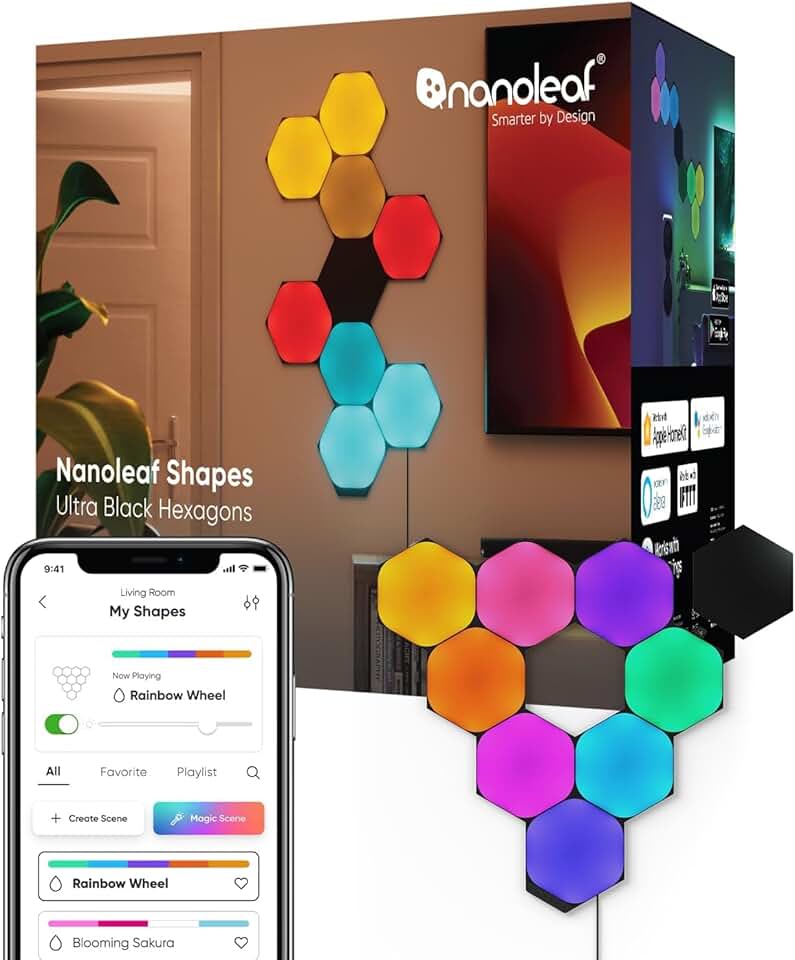
Modular, customizable LED panels that can be arranged in any design · Vibrant RGBW lighting with millions of color options and dynamic scenes · Reacts to music and gaming, creating an engaging atmosphere
Nanoleaf Shapes provide a unique and artistic way to add smart lighting to your walls, offering extensive customization and reactive effects.
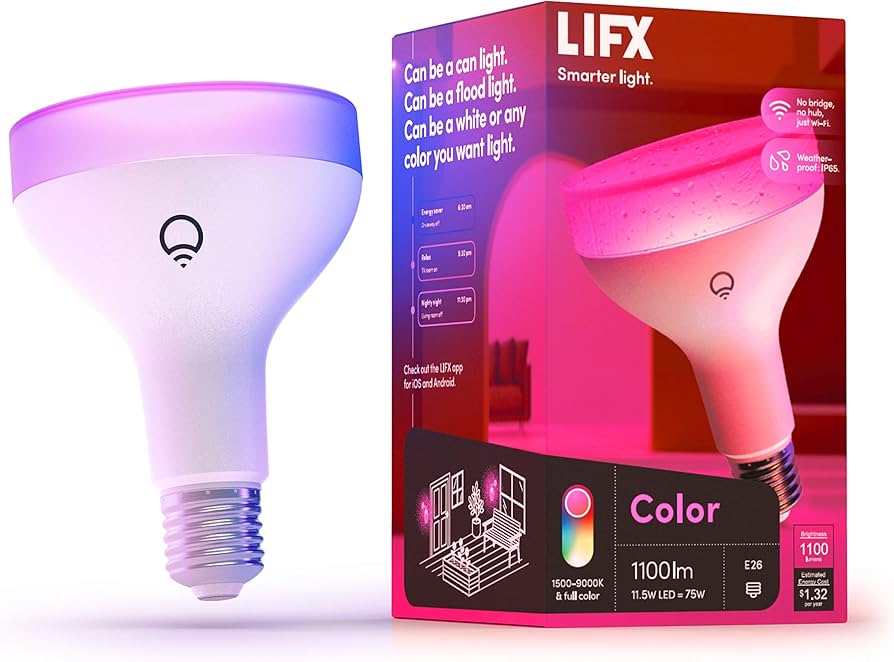
1000 lumens brightness with full RGBW color spectrum · Direct Wi-Fi connectivity, no hub required · App-controlled dimming, color changes, and scheduling
The LIFX Color bulb delivers bright, vibrant colors and convenient Wi-Fi control directly from your smartphone, making it a versatile smart lighting option.

Smart dimmer switch designed for LED lights · Works with Lutron Smart Hub (required) for app and voice control · Single-pole or 3-way installation, no neutral wire needed
The Lutron Caseta dimmer offers reliable and robust smart lighting control, especially for users who may not have a neutral wire in their switch box.

Includes Hue Bridge for reliable connectivity and advanced features · Four White and Color Ambiance bulbs for millions of color options · Full compatibility with Alexa, Google Assistant, and Apple HomeKit
This starter kit is the perfect entry point into the Philips Hue ecosystem, providing a reliable bridge and versatile color-changing bulbs for a comprehensive smart lighting setup.
As an Amazon Associate I earn from qualifying purchases. Prices may vary.
Security: Smarter Protection
Smart home security has come a long way, but it’s still important to be vigilant. Video doorbells from Ring, Nest, and Eufy are popular choices, offering features like motion detection, two-way audio, and video recording. Security cameras from Arlo and Wyze provide comprehensive surveillance, with options for indoor and outdoor use. Smart locks from Yale and August offer keyless entry and remote control.
End-to-end encryption is a must-have for any smart security device. This ensures that your video and audio recordings are protected from unauthorized access. Local storage options are also a good idea, as they give you more control over your data and reduce your reliance on the cloud. Eufy, for example, offers cameras with local storage, avoiding monthly subscription fees.
Integrating your security system with professional monitoring services can provide an extra layer of protection. Companies like SimpliSafe and ADT offer 24/7 monitoring and emergency dispatch services. However, be aware that these services typically come with a monthly fee. Consider your needs and budget when deciding whether or not to opt for professional monitoring.
Don’t neglect the basics of home security. Strong passwords, regular software updates, and a healthy dose of skepticism are all essential. Be wary of phishing scams and avoid clicking on suspicious links. A smart home security system is a valuable tool, but it’s not a substitute for common sense.
- Ring: Popular video doorbells and security cameras, integrated ecosystem.
- Nest: Smart thermostats, security cameras, and video doorbells, Google integration.
- Eufy: Security cameras with local storage, no monthly fees, good value.
- Arlo: High-quality security cameras, wireless and weatherproof, cloud storage options.
- Wyze: Affordable security cameras and smart home devices, good for beginners.
- Yale & August: Smart locks, keyless entry, remote control.
Entertainment: The Connected Living Room
Smart TVs are now standard, but a streaming device like an Apple TV or Nvidia Shield can enhance your experience. Nvidia Shield is particularly popular with gamers, offering support for GeForce Now cloud gaming. Multi-room audio systems like Sonos and Bluesound allow you to stream music throughout your home, seamlessly.
Voice control is a game-changer for entertainment. You can use voice commands to control your TV, adjust the volume, and search for content. Integration with other smart home devices allows you to create automated scenes that enhance your viewing experience. For example, you could have the lights dim automatically when you start a movie.
Ambient lighting synced with entertainment is becoming increasingly popular. Philips Hue offers a gradient lightstrip that can be synced with your TV, creating an immersive viewing experience. Nanoleaf Shapes can also be synced with music and games, adding another layer of visual excitement.
Consider the audio quality of your entertainment setup. A soundbar or surround sound system can significantly improve the audio experience. Sonos offers a range of high-quality audio products that integrate seamlessly with other smart home devices.
What is the most important factor when choosing a smart home automation device in 2026?
As a tech enthusiast building your ideal smart home setup, which feature matters most to you when evaluating new automation devices? Vote below and share your reasoning in the comments!
Energy Management: Saving Smarter
Smart thermostats from Ecobee and Nest learn your heating and cooling preferences and automatically adjust the temperature to save energy. Smart plugs allow you to remotely control appliances and devices, turning them off when they’re not in use. Energy monitoring systems provide detailed insights into your energy consumption, helping you identify areas where you can save money.
These devices can help homeowners save a significant amount of money on their energy bills. According to a study by the National Resources Defense Council, smart thermostats can save homeowners up to 10% on their heating and cooling costs. Energy monitoring systems can help you identify phantom loads – devices that consume energy even when they’re turned off.
Integrating energy management with renewable energy sources like solar panels can further reduce your carbon footprint. Smart inverters can optimize the use of solar energy, storing excess energy in batteries for later use. Some energy management systems can also participate in demand response programs, automatically reducing your energy consumption during peak demand periods.
Look for devices that are certified by Energy Star, a program run by the U.S. Environmental Protection Agency. Energy Star certification ensures that a product meets certain energy efficiency standards. Consider the long-term cost of ownership, including the purchase price, energy savings, and maintenance costs.
DIY & Open Source Standouts
For the truly adventurous, the DIY and open-source world offers endless possibilities. ESPHome and Tasmota are popular firmware options that allow you to flash custom code onto inexpensive ESP32 and ESP8266 microcontrollers, turning them into smart home devices. This is a great way to create custom sensors and actuators that aren’t available commercially.
Home Assistant is the central hub for many DIY smart home enthusiasts. Its flexibility allows you to integrate custom sensors and devices, creating a truly personalized smart home experience. The community is incredibly active, providing support and sharing projects. You can find countless tutorials and guides online.
Consider building your own environmental sensors to monitor temperature, humidity, air quality, and more. You can use readily available sensors and microcontrollers to create a custom sensor network that provides detailed insights into your home environment. These sensors can be integrated with Home Assistant to trigger automations based on real-time data.
A project gaining traction involves building a custom energy monitoring system using a current transformer and an ESP32. This allows you to monitor the energy consumption of specific appliances or circuits, providing even more detailed insights than a whole-house energy monitor. The learning curve is steeper, but the rewards are significant.
- ESPHome: Firmware for ESP32 and ESP8266 microcontrollers, easy to use, YAML-based configuration.
- Tasmota: Open-source firmware for ESP32 and ESP8266 microcontrollers, supports a wide range of devices.
- Home Assistant: Central hub for DIY smart home projects, highly flexible, large community.
DIY Smart Home Projects
- Custom Weather Station - Build a hyperlocal weather station using a Raspberry Pi, a BME280 sensor (temperature, humidity, pressure), and a rain gauge. Display data on a custom dashboard or integrate with services like IFTTT.
- Smart Irrigation System - Automate your garden watering with an Arduino or ESP32, soil moisture sensors, and a relay module to control a water pump or sprinkler valves. Monitor and adjust watering schedules remotely.
- Voice-Controlled Mirror - Create a 'magic mirror' using a Raspberry Pi, a two-way mirror, and a display. Integrate voice control via Mycroft or Snips (now part of Rhasspy) to display information like time, weather, news, and calendar events.
- Automated Plant Watering System - Utilize a micro-controller like the ESP32 and capacitive soil sensors to detect moisture levels and trigger a small water pump to hydrate plants automatically. Data logging and remote monitoring are also possible.
- DIY Home Security System - Assemble a security system using Raspberry Pi, a camera module, and motion sensors. Implement features like motion detection, email alerts, and remote viewing.
- Smart Blinds/Curtains - Automate window coverings with a DC motor, a microcontroller, and light sensors. Program schedules based on time of day or sunlight intensity.
- Presence Detection System - Use ESP32 microcontrollers and Bluetooth Low Energy (BLE) scanning to detect the presence of devices (and therefore people) in different rooms. This data can be used to trigger lighting or HVAC adjustments.
Future-Proofing Your Setup
The smart home landscape is constantly evolving, so it’s important to choose devices and systems that will remain compatible and secure for years to come. Prioritize devices that support open standards like Matter, as these are more likely to work with future platforms and ecosystems. Avoid vendor lock-in whenever possible.
Advancements in AI and machine learning will play a significant role in the future of smart homes. Expect to see more sophisticated automation routines that learn from your behavior and adapt to your needs. Edge computing, which processes data locally rather than in the cloud, will become increasingly important for privacy and security.
The rollout of 6G and other emerging wireless technologies will enable faster and more reliable connectivity. This will support more complex smart home applications, such as augmented reality and virtual reality. However, it’s important to remember that new technologies often come with new security risks, so it’s essential to stay vigilant.
Don’t be afraid to experiment with new technologies, but always prioritize security and privacy. Read reviews, research products, and choose devices from reputable manufacturers. A well-planned and future-proofed smart home will provide years of convenience, security, and energy savings.

No comments yet. Be the first to share your thoughts!