

Home Assistant 2026.5: A First Look
Home Assistant's latest release, version 2026.5, is generating a lot of buzz. Byte of Geek and Smart Home Junkie have highlighted this as a significant update. People are excited; videos detailing the changes have gained many views. This enthusiasm comes from substantial improvements and a continued commitment to Home Assistant's core principles.
Home Assistant is about local control and privacy. Unlike many smart home platforms, it runs on your own hardware, keeping your data within your network. This approach means you aren't reliant on a company’s servers or subject to their data policies. This version builds on that foundation, offering more power and flexibility to those who want to truly own their smart home experience.
Byte of Geek specifically calls out 'massive changes' in this release, hinting at a substantial overhaul of existing features and the introduction of new capabilities. Smart Home Junkie echoes this sentiment, focusing on what they describe as one of the biggest dashboard updates in months. This suggests a focus on the user interface, making Home Assistant more accessible and user-friendly without sacrificing its underlying power.
Home Assistant continues to expand its integrations, supporting a growing number of devices and services. The documentation is extensive, and the community is incredibly active, providing support and developing custom components. It’s a project driven by passionate users, constantly evolving to meet the needs of smart home enthusiasts.
SmartThings: The Established Ecosystem
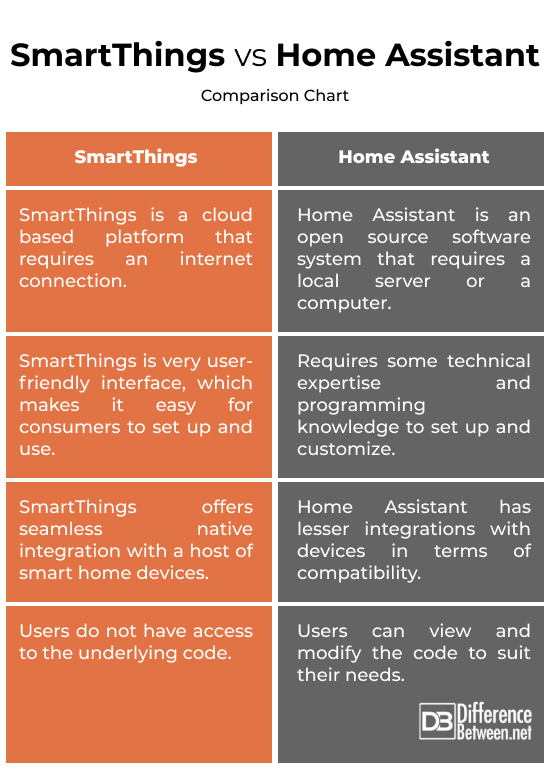
SmartThings has been a major player in the smart home space for years, establishing itself as a user-friendly and widely compatible platform. It’s a good choice for those who want a relatively easy setup process and broad device support without needing to tinker extensively with code or configuration files. Its strength lies in its simplicity and the convenience it offers.
The platform has a large user base and a mature ecosystem of compatible devices, from lights and thermostats to locks and security systems. This makes it easy to find devices that work seamlessly with SmartThings, minimizing compatibility headaches. For many, this 'just works' experience is a major selling point.
However, SmartThings relies heavily on cloud connectivity. Your smart home functions through Samsung's servers, which means an internet outage can disrupt your automation and control. There are also privacy considerations, as your data is stored and processed by Samsung. While they have security measures in place, you should be aware of the potential implications.
Core Differences: Local vs. Cloud
The fundamental difference between Home Assistant and SmartThings boils down to their approach to data processing and control: local versus cloud. Home Assistant prioritizes local control, meaning your data and automations run on your own hardware, within your network. SmartThings, on the other hand, relies on cloud servers to manage your devices and execute your rules.
This difference has significant implications for reliability. If your internet connection goes down, a Home Assistant-based smart home will continue to function, albeit with limited functionality for devices that require cloud access. A SmartThings-based system, however, can become largely unresponsive. This is a critical consideration for those who rely on their smart home for security or essential functions.
Privacy is another key differentiator. With Home Assistant, you have complete control over your data. You decide what data is collected, how it’s stored, and who has access to it. SmartThings, while offering privacy settings, still requires you to trust Samsung with your data.
Customization is also where Home Assistant pulls ahead. Its open-source nature and flexible architecture allow for an unparalleled level of customization. You can tailor the platform to your exact needs, integrating with a wide range of devices and services, even those not officially supported. SmartThings offers customization options, but they are generally more limited.
Home Assistant 2026.5 vs. SmartThings: Platform Comparison
| Criteria | Home Assistant 2026.5 | SmartThings |
|---|---|---|
| Local Control | High | Medium |
| Privacy | High | Medium |
| Device Compatibility | Medium | High |
| Ease of Use | Low | High |
| Customization | High | Medium |
| Reliability (Internet Outage) | High | Low |
| Cost (Initial) | Medium | Low |
| Cost (Ongoing) | Low | Medium |
Illustrative comparison based on the article research brief. Verify current pricing, limits, and product details in the official docs before relying on it.
2026.5’s Big Changes: What’s New?
Home Assistant 2026.5 brings a wave of updates, with the dashboard receiving particular attention. Smart Home Junkie highlights this as a major focus, describing it as one of the biggest dashboard updates in months. The changes center around improving usability and making it easier to visualize and interact with your smart home data.
Byte of Geek points to other 'massive changes' that aren’t specifically UI related. These include improvements to the underlying architecture and several new integrations. While the specifics require diving into the release notes, the overall impression is of a more robust and feature-rich platform.
One addition is improved support for Matter, the emerging connectivity standard aimed at unifying the smart home ecosystem. This allows for easier integration of Matter-compatible devices, regardless of their manufacturer. Home Assistant has been an early adopter of Matter, and this release further solidifies its commitment to the standard.
The release also includes refinements to the energy management features, allowing you to track your energy consumption more accurately and identify opportunities for savings. This is becoming increasingly important as energy prices rise and homeowners look for ways to reduce their environmental impact. The documentation details what’s been improved in this area, including new sensors and data visualizations.
Beyond these headline features, this release includes a host of smaller improvements and bug fixes, contributing to a more stable and reliable experience. The development team is clearly focused on refining the platform and addressing user feedback.
Device Compatibility: A Practical View
SmartThings generally has the edge when it comes to 'out of the box' device compatibility. Its broad partnerships with manufacturers mean that many popular devices will simply work with SmartThings without requiring any additional configuration. This is a significant advantage for users who want a hassle-free setup experience.
However, Home Assistant’s compatibility is rapidly expanding, thanks to its active community and open-source nature. While it may not support every device natively, there’s a good chance someone has already created a custom integration for it. The Home Assistant community forums are a resource for finding these integrations.
For common device types like lights (Philips Hue, LIFX), thermostats (Ecobee, Nest), and locks (Yale, Schlage), both platforms offer excellent support. However, Home Assistant’s ability to integrate with less common or DIY devices gives it a distinct advantage. It’s a better choice for those who want to build a truly customized smart home.
Ultimately, the best platform for device compatibility depends on your specific needs and the devices you already own. If you have a lot of mainstream devices, SmartThings is a safe bet. If you have a mix of mainstream and niche devices, or if you enjoy tinkering, Home Assistant is worth considering.
Featured Products

Includes Philips Hue Bridge and four color ambiance LED bulbs · Control lighting via the Philips Hue app · Compatible with Alexa, Google Assistant, and Apple HomeKit
This starter kit provides a foundational set of smart lights that integrate seamlessly with various smart home ecosystems.
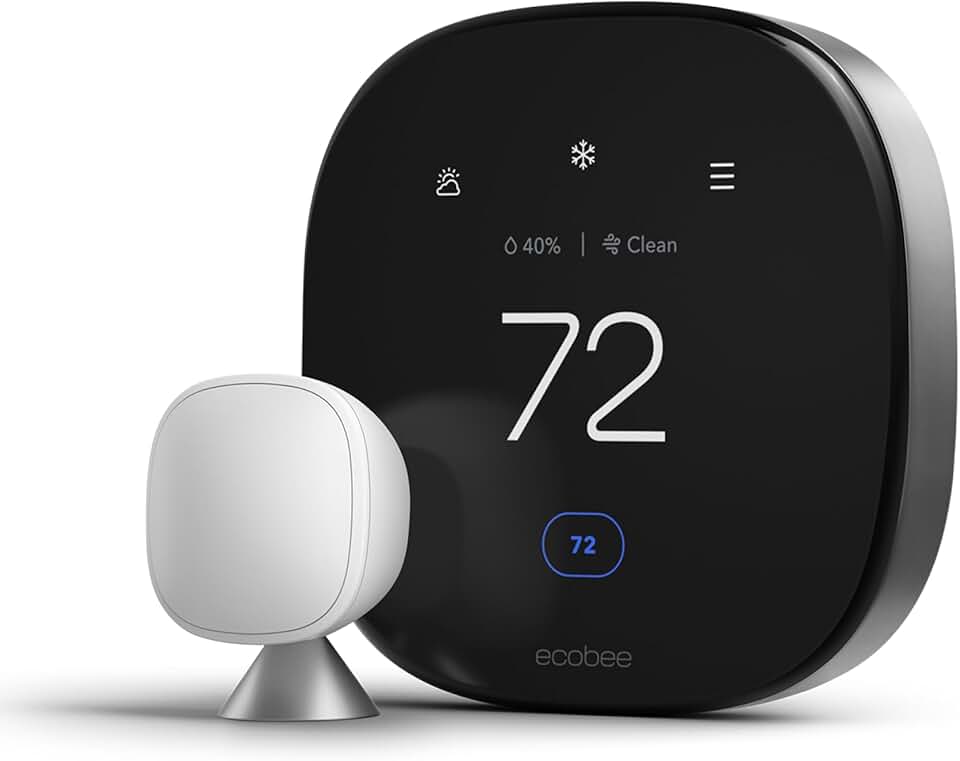
Smart thermostat with integrated smart sensor and air quality monitor · Programmable and controllable via Wi-Fi · Works with Siri, Alexa, and Google Assistant
The ecobee Smart Thermostat offers advanced climate control and environmental monitoring, supporting multiple voice assistants.

Key-free, touchscreen smart lock · Ridgefield handleset in black · Offers secure, keyless entry
This smart lock provides a modern and secure way to manage home access, compatible with many smart home setups.

Compact smart speaker with vibrant sound · Designed for Alexa voice control · Suitable for various rooms like bedrooms, dining rooms, and offices
The latest Echo Dot serves as an affordable and versatile voice assistant hub, ideal for controlling smart devices and accessing information.

Weather-resistant outdoor security camera · Features Live View, Color Night Vision, and Two-Way Talk · Sends motion alerts and works with Alexa
This outdoor camera provides robust security features and integrates easily with Alexa-enabled smart home systems.
As an Amazon Associate I earn from qualifying purchases. Prices may vary.
Automation Power: Rules & Scripts
SmartThings offers a visual rule builder, allowing you to create automations by selecting triggers and actions from a menu. This is a user-friendly approach, especially for beginners. You can create simple automations, such as turning on lights at sunset or sending a notification when a door is opened, without writing any code.
Home Assistant, on the other hand, relies on YAML configuration files for its automations. This can be daunting for those unfamiliar with coding, but it offers a level of flexibility and power that SmartThings simply can’t match. You can create complex automations with multiple conditions, actions, and variables.
With Home Assistant, you’re not limited to the pre-defined triggers and actions offered by the platform. You can write custom scripts using Python or other programming languages, giving you complete control over your smart home. This allows for personalized and sophisticated automations.
For example, you could create an automation that adjusts the thermostat based on the weather forecast, your location, and your energy usage patterns. Or you could create a security system that automatically locks the doors, arms the alarm, and sends you a notification if motion is detected. These types of automations are possible with SmartThings, but they require more effort and may not be as reliable.
The Learning Curve: Who Wins?
SmartThings is easier to get started with. The intuitive interface and guided setup process make it accessible to users with little to no technical experience. You can have a basic smart home up and running in minutes.
Home Assistant, however, has a steeper learning curve. Setting it up requires some technical knowledge, and configuring automations can be challenging, especially for beginners. You’ll need to be comfortable with concepts like YAML, IP addresses, and network configuration.
The Home Assistant community is incredibly helpful. There are extensive documentation, forums, and tutorials available online. However, you’ll still need to invest a significant amount of time and effort to master the platform.
Both platforms offer excellent community support. SmartThings has a large and active user base, while Home Assistant’s community is known for its expertise and willingness to help. Home Assistant requires a greater initial investment of time and effort to reach the same level of proficiency.
- Choose SmartThings if: You want a simple, easy-to-use platform with broad device compatibility.
- Choose Home Assistant if: You're a tech enthusiast who wants complete control and customization options.
Beyond the Basics: Future-Proofing
When considering a smart home platform, it’s important to think about the long term. Home Assistant’s open-source nature and community-driven development provide a degree of future-proofing. Because the code is open, anyone can contribute to its development, ensuring that it continues to evolve and adapt to new technologies.
SmartThings, on the other hand, is controlled by Samsung. Its future depends on Samsung’s continued investment in the platform. While Samsung is a large and stable company, there’s a risk that they could discontinue support for SmartThings or change its direction in a way that doesn’t align with your needs.
The growing adoption of Matter is also a factor. Both platforms support Matter, but Home Assistant’s open-source nature allows it to adapt more quickly to changes in the Matter standard. This could give it an advantage.


No comments yet. Be the first to share your thoughts!