

How thread works
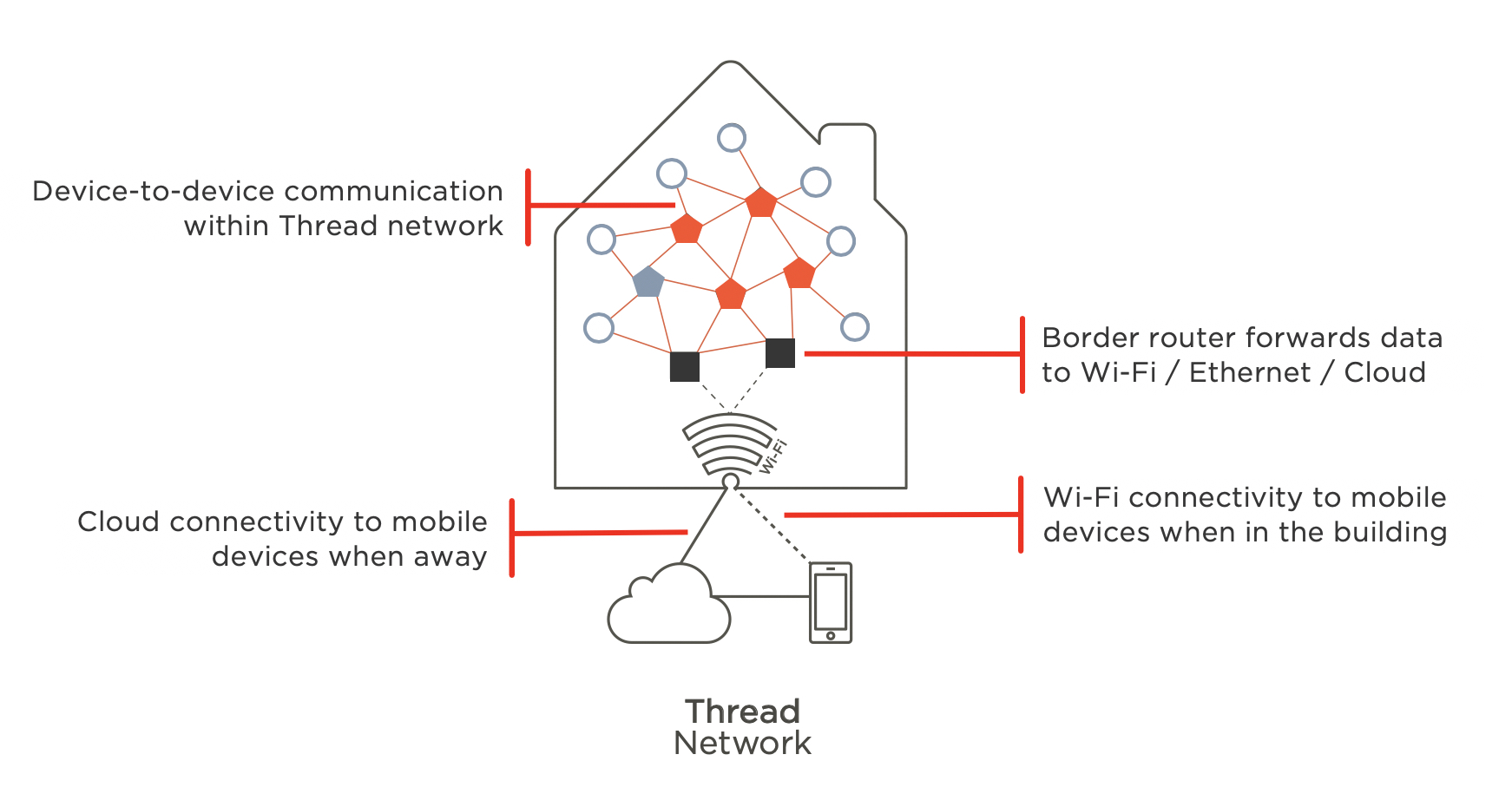
For years, the smart home felt… fragmented. Different devices speaking different languages, relying on overloaded WiFi, and generally being a pain to get working together smoothly. That’s changing, and a lot of the credit goes to a networking protocol called Thread. It’s designed from the ground up for the unique demands of low-power devices, creating a self-healing mesh network that’s more reliable and secure than traditional WiFi-based systems.
The benefits are significant. Thread uses less energy, meaning longer battery life for your sensors and locks. Its mesh network means devices can relay signals, extending the range of your smart home coverage. And it’s built with security in mind, incorporating robust encryption and authentication. But Thread isn’t operating in a vacuum; it's a foundational piece of something bigger: Matter.
Matter is a new interoperability standard aiming to unify the smart home. It allows devices from different manufacturers to communicate seamlessly, regardless of their underlying protocols. Thread is one of the supported protocols within Matter, acting as the transport layer—the way devices actually talk to each other. 2026 feels like a key year because Matter adoption is expected to accelerate significantly, and with it, the demand for Thread-enabled devices and Thread Border Routers will surge.
We’re entering a phase where smart home setup should be, well, smarter. Less frustration, more reliability, and a future where your devices just work together. Thread, coupled with Matter, is making that future a reality. It's a significant shift, and one worth understanding if you're invested in building a robust smart home network.
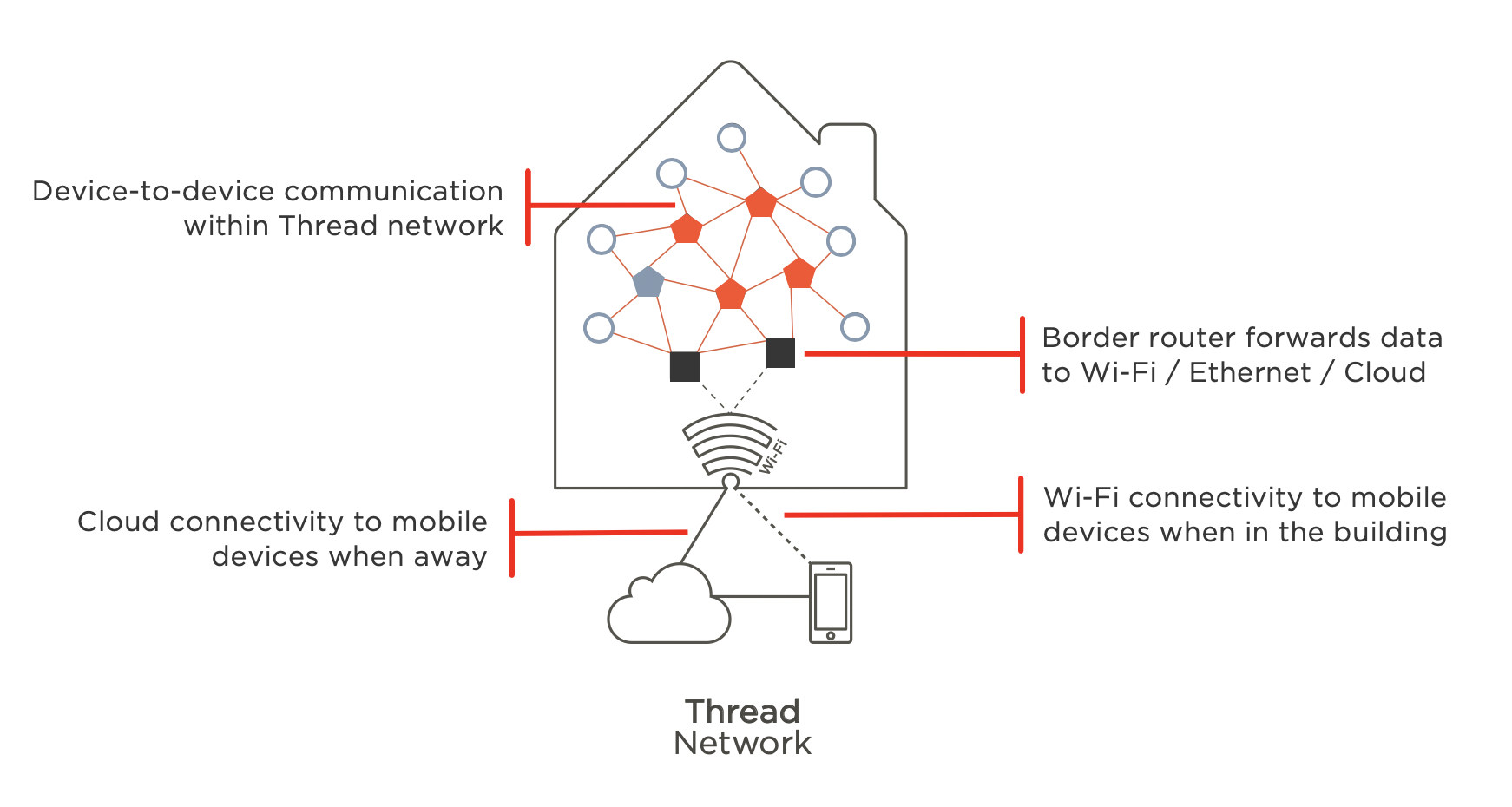
Current border router options
A Thread network requires a Thread Border Router – it’s the bridge between your Thread devices and your home network, and ultimately, the internet. While Thread doesn’t need a traditional hub, the Border Router is essential for remote access and control. The good news is that several popular devices already function as Thread Border Routers, and more are coming online.
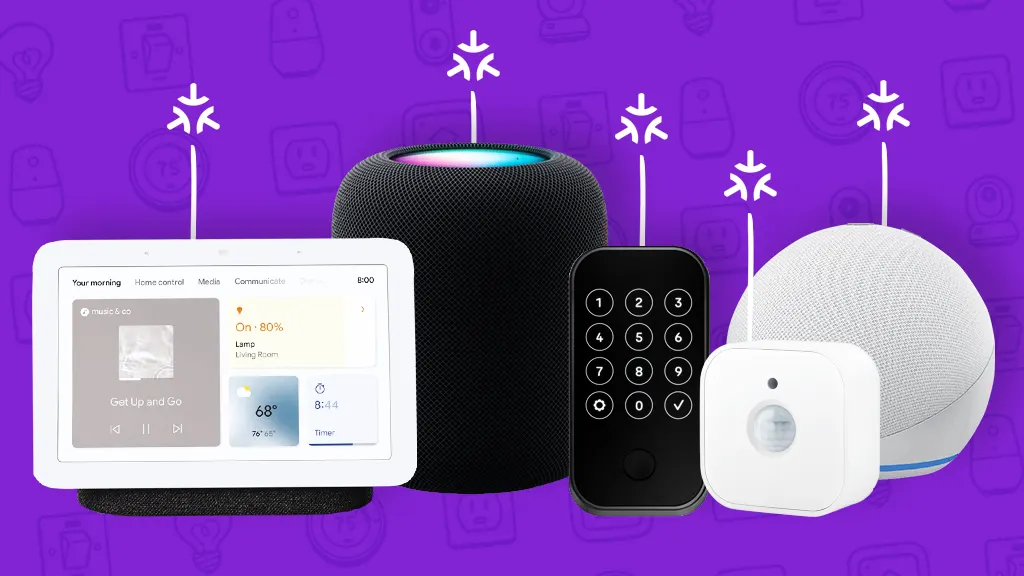
Apple includes Thread in the HomePod mini and Apple TV 4K (2nd gen or newer). Google has it in the Nest Hub Max and Nest Wifi Pro. If you use Amazon's ecosystem, the Eero Pro 6E and Eero 6+ mesh systems are the primary options.
Beyond these major players, the market is expanding. The Eve Aqua HomeKit Smart Water Controller also functions as a Thread Border Router, which is somewhat unusual for a device primarily focused on a specific function. The SkyConnect from Nabu Casa is specifically designed to be a Thread Border Router and supports both Thread and Zigbee. This is a useful option if you want a dedicated device.
Matter compatibility is a key consideration. All the devices listed above support Matter over Thread, meaning they can seamlessly integrate with other Matter-certified devices. As of early 2026, the selection is solidifying, but expect to see more options emerge as the Matter standard gains wider acceptance.
- Remove entire list.
- Apple TV 4K (2nd gen+): Supports Thread and Matter
- Google Nest Hub Max: Supports Thread and Matter
- Google Nest Wifi Pro: Supports Thread and Matter
- Eero Pro 6E: Supports Thread and Matter
- Eero 6+: Supports Thread and Matter
- Eve Aqua: Supports Thread and Matter
- SkyConnect: Supports Thread and Matter
Thread Border Router Comparison - 2026
| Brand | Model | Matter Support | Price (approximate) | Ethernet Port | Other Notable Features |
|---|---|---|---|---|---|
| Apple | Apple HomePod (2nd generation) | Yes | Approximately $299 | No | Built-in Siri, WiFi 6 |
| Apple | Apple HomePod mini | Yes | Approximately $99 | No | Built-in Siri, WiFi 5 |
| Google Nest Hub (2nd gen) | Yes | Approximately $99 | No | Built-in Google Assistant, WiFi 6 | |
| Google Nest Wifi Pro | Yes | Approximately $199 | Yes | WiFi 6E, Mesh Networking | |
| Eve Systems | Eve Aqua Thread | Yes | Approximately $149 | No | Water sensor, Thread/Bluetooth |
| Nanoleaf | Nanoleaf Shapes | Limited | Approximately $249 | No | Modular LED lighting panels, WiFi |
| Samsung | SmartThings Station | Yes | Approximately $79 | Yes | Zigbee, Z-Wave, Matter support |
Illustrative comparison based on the article research brief. Verify current pricing, limits, and product details in the official docs before relying on it.
How to choose a router
Selecting a Thread Border Router isn't just about picking the cheapest option. Several factors influence which router will best suit your needs. Your existing smart home ecosystem is a big one. If you're heavily invested in Apple HomeKit, an Apple TV 4K or HomePod mini makes sense. Similarly, if you're a Google Home user, a Nest Hub Max or Nest Wifi Pro will offer the smoothest integration.
Your WiFi setup also matters. If you have a mesh WiFi system, an Eero router with Thread support can be a convenient all-in-one solution. If you’re using a single router, ensure it’s stable and reliable, as the Border Router relies on a solid WiFi connection to function properly. A flaky WiFi connection will translate to a flaky Thread network.
Budget is, of course, a consideration. The SkyConnect is a relatively affordable, dedicated Thread Border Router. Apple and Google’s offerings tend to be more expensive, but they offer additional functionality (like smart speakers or mesh WiFi). Finally, think about desired features. Do you need an ethernet port for a wired connection? A built-in speaker for voice control? These features can influence your decision.
Don’t underestimate the simple act of checking compatibility. While Matter aims for universal interoperability, it’s always wise to confirm that the Border Router and your Thread devices are all Matter-certified for the best experience. A little research upfront can save you headaches down the road.
Setup and configuration
Setting up a Thread Border Router generally follows a similar pattern, though the specific steps will vary depending on the manufacturer. The first step is typically connecting the router to your WiFi network and ensuring it has the latest firmware installed. This is usually done through a mobile app associated with the router.
Once connected and updated, you’ll need to enable Thread in the router’s settings. This might be a simple toggle switch or a more involved process of navigating through menus. The documentation for your specific router will be your best guide here. Be prepared to give your Thread network a name – this will help you identify it within your smart home app.
Pairing Thread-enabled devices is usually initiated through your smart home app (e.g., Apple Home, Google Home). The app will guide you through the process, which typically involves putting the device into pairing mode and allowing it to discover the Thread network. The app will then handle the rest of the configuration.
Thread is a mesh network, so devices connect to each other automatically. You still need to think about placement; if a sensor is too far from the border router or the nearest plugged-in Thread device, it won't join the network.
Fixing common problems
Even with the promise of a more reliable network, Thread isn’t immune to issues. One of the most common problems is device pairing failures. Ensure the device you’re trying to pair is compatible with Thread and Matter, and that it’s within range of the Border Router or another Thread device. Try restarting both the device and the Border Router.
Connectivity issues can also arise. If a device loses connection, check its battery level and ensure it hasn't been moved out of range. Interference from other wireless devices can also be a culprit. Try moving the Border Router or the affected device away from sources of interference, such as microwaves or Bluetooth devices.
Another potential problem is network congestion. While Thread is designed to handle a large number of devices, an extremely dense network can still experience performance issues. Consider reducing the number of devices connected to the network or upgrading to a more powerful Border Router.
Finally, remember to keep your router’s firmware up to date. Manufacturers often release updates that address bugs and improve performance. Regularly checking for updates can prevent many common issues. If you've exhausted these steps, consulting the manufacturer’s support resources is always a good idea.
Home Assistant and Thread: Advanced Control
For users who want maximum control and customization, integrating Thread devices with Home Assistant is a powerful option. Home Assistant is an open-source home automation platform that allows you to connect and control a wide range of devices, regardless of their manufacturer or protocol.
According to the Home Assistant community forums, adding a Thread Border Router is fairly straightforward. You’ll need to install the OpenThread Border Router add-on within Home Assistant. Once installed, you can configure it to connect to your Thread network. Home Assistant will then automatically discover Thread devices on your network.
This integration unlocks advanced automation possibilities. You can create custom rules and scenes that leverage the low-power and reliable nature of Thread. For example, you could create an automation that turns on lights when a Thread-enabled motion sensor detects movement, or lock a door when a Thread-enabled door sensor is triggered.
Several integrations and plugins enhance the Home Assistant Thread experience. The "Zigbee2MQTT" integration can be used to control Zigbee devices through a Thread Border Router, providing a unified interface for all your smart home devices. The Home Assistant community is constantly developing new integrations, expanding the capabilities of Thread within the platform.


No comments yet. Be the first to share your thoughts!